Skip to content
| Manual Bsera
| Manual Bsera

English
English
Arabic French

| Manual Bsera
| Manual Bsera
Popular Search reportreport cardBehaviorالمالت

Teacher Account

  • Login Page
  • Motivation
    • The New Way of Learning
    • My Score
  • Home Page
    • Edit Profile
    • Homepage
    • My Tasks & Action Required 
    • Courses Widget (All Courses)  
    • Announcements & Upcoming Events 
    • PUBLIC PROFILE 
    • Clubs Courses
  • Show all courses
    • COURSES
      • Charts and Behavior Analysis
      • Tab 1
        • Excel Sheet Grades Import
        • Manage Students Groups
        • Managing Content
        • Lecture Management
        • Students List
        • Students’ Report Summary
      • Tab 2
        • Course Materials
        • Video Lectures
      • Tab 3
        • In-Class Activity
        • Assignments, Exams
        • Assignment Actions
        • Assignment Sections
        • Assignment Questions
        • Exams
        • Exam Styles
        • Exam Sections
        • Assignment settings
        • Exam Settings
        • Exam Settings | More options
      • Tab 4
        • Digital Libraries
        • Weekly Study Plan
        • Semester Plan
        • Course Preparations
      • Tab 5
        • Management of Timetable 
  • Books
    • Books
  • Classroom Attention Indicator
    • Classroom Attention Indicator –
  • Messages
    • Sent Messages
    • Draft Messages
    • Archived Messages
    • Compose
    • Deleted Messages
  • Discussions
    • Discussion Rooms
    • Adding New Discussion Rooms
    • Adding New Posts
    • Comments Management
  • Questions Banks
    • Add Questions from Q-Banks
    • Exam Questions
    • Add Bulk Questions
  • My Schedule
    • Schedule
    • Academic Calendar
      • Academic Calendar
      • Editing Events
      • Adding Events
  • Virtual Classes
    • Virtual Classrooms
  • Teacher Library
    • PUBLIC LIBRARY
    • VIRTUAL LABS 
    • My Files
  • Absence Report
    • Absence Report
  • Certificates | Letters
    • Issued Certificates | Letters
    • Certificates | Letters
    • My Certificates
    • Sign Multiple Certificates
    • My Letters
    • Issue Certificates
  • Teacher B~SERA AI
    • Manage Content (Xsera) 
    • My Teaching Hub 

Parent Account

  • Login Page
  • Homepage
    • Personal Menu
    • Edit Profile
    • Personalized Child Dashboard & Learning Analytics 
    • Services & Quick Access Tools 
    • Homepage
    • Student Accounts
  • Messages
    • Deleted Messages
    • Draft Messages
    • Archived Messages
    • Compose
    • Sent Messages

Student Account

  • Login Page
  • Home Page
    • Personal Menu
    • Edit Profile
    • Quick Access – Exams, Assignments, Virtual Class 
    • Student Homepage
  • Subjects
    • Subjects
    • Course Materials
    • Video Lectures
    • Discussion Rooms
    • Online Assignments 
    • Exams
  • Previous Course Contents
    • Previous Subject Contents
  • Book
    • books
  • My Schedule
    • Schedule
    • Weekly Study Plan
    • Academic Calendar
      • Academic Calendar
      • Adding Events
      • Editing Events
  • Digital Library
    • Digital Library 
    • Subjects Library
    • Public Library
    • Custom Libraries
    • My files
  • Evaluation Tools
    • Evaluation
    • form
  • Virtual Classes
    • Virtual Classrooms
  • Messages
    • Draft Messages
    • Messages
    • Compose
    • Inbox
    • Sent Messages
    • Archived Messages
    • Deleted Messages
  • Attendance
    • Daily Lateness
    • Lesson Absences
    • Daily Absences
    • Subject Absences Summary
    • Lesson Lateness
    • Absences Summary
  • Certificates | Letters
    • Certificates | Letters
  • Student B~SERA AI
    • Circle to Learn  
    • Study Plan (Student) 
    • My Learning Hub 

Teacher Supervisor Account

  • Login Page
  • Homepage
    • Edit Profile
    • Announcements & Upcoming Events 
    • Courses Widget (All Courses)  
    • My Tasks & Action Required 
    • Homepage
  • Academic Calendar
    • Calendar
    • Editing Events
    • Adding Events
  • Certificates | Letters
    • Issue Certificates
    • Certificates | Letters
    • My Letters
    • My Certificates
    • Issued Certificates | Letters
  • Evaluations | Surveys
    • Forms
    • Evaluation | Surveys
  • Messages
    • Draft Messages
    • Compose
    • Archived Messages
    • Mailbox
    • Deleted Messages
    • Sent Messages
  • Management Reports
    • Management Reports
  • Public Library
    • Public Library/Digital Content
  • Questions Banks
    • Questions Banks
  • Teachers list
    • Exams/Homework Without Questions
    • Teachers’ List
  • Virtual Classrooms
    • Upcoming Smart Classes
    • All Smart Classes
    • Recorded Smart Classes
    • Virtual Classrooms
  • Weekly Plan
    • Weekly Plan
  • Question Banks
    • Question Banks
  • Teachers' Statistics
    • Teachers’ Statistics
  • Teachers' Attendance Report
    • Teachers’ Attendance Report
  • Central Exams Comprehensive Report
    • Central Exams Comprehensive Report

Administrator Account

  • Login Page
  • Dashboard/Realtime Overview
    • Teachers Attendance Report
    • Teachers’ Preparations Report
    • Students’ Scores
    • Most Active Teachers in the Group
    • Online Users
    • Dashboard/Realtime Overview
  • important links
    • IMPORTANT LINKS 
  • Homepage
    • Edit Profile
    • Favorite Reports  
    • Goals Module (Xsera Quests) 
    • To Do List and Announcements 
    • Action Queue 
    • Active Alerts 
    • Personal Menu
    • Homepage
  • Support / Request
    • Transfer All School Guardians
    • Activation Ticket Resolution Report
    • Transfer Student
    • Fix Score
    • User Information
    • Guardian Transfer
    • New Feature Requests
    • LMS Support
    • Activation Ticket Resolution 
    • Internal Support
    • FAQs
  • Users
    • Manage Badge
    • Enhancements to User Management Filters
    • Users / Students
    • Students Without Sections
    • Guardians
    • Teachers
    • Teacher’s Statistics
    • Supervisors
    • Management
  • Weekly Plan
    • Weekly Plan /Dynamic weekly
    • weekly plan / Static
  • Subject Management
    • Questions Banks
    • Schedule Journal
    • Courses Management
    • Courses
    • Adding Courses
    • Course Templates
    • Trees
    • Areas
    • Areas – Adding Criteria
    • Exams Schedule
    • Exams Mark Comparison
    • Full Schedule
    • lectures
      • Lectures/ Schedules 
      • Lectures – Students List
      • Adding Lectures
      • Lectures/Manage Halls and Manage Medals 
      • Alternative Teacher
      • Lectures
      • Managing Timeslots
      • Adding Bulk Lectures
  • Settings
    • Enable PDF Conversion
    • Closure Management
    • Settings /part one
    • System Settings – part Two
    • System Settings / part three
    • System Settings—Part Four
    • Stages
    • Years
    • Years/Adding a Semester Plan
    • Years – Copy to Semester
    • Review Students E-Portfolios
  • Calendar
    • Adding Tasks to Calendar
    • Editing Events
    • Adding Events
    • Calendar
  • Messages
    • Draft Messages
    • Archived Messages
    • Inbox
    • Sent Messages
    • Compose
    • Deleted Messages
  • Announcements
    • Announcements
  • Report
    • Reports
    • Management Reports
    • Admissions Request Report
    • Redemption Statistics
    • Schools: C-Inspire Report
    • Students Badge Report
    • Medals Report
    • Files Log
    • School Group Absences
    • Full Day Absences Detailed Report
    • Lectures Absences Detailed Report
    • Activity Log
    • Messages Log
    • Score Drop
    • VCR Activation Report
    • Modules Activation Report
  • Certificates | Letters
    • Certificates | Letters
  • Forms and Assessments
    • Forms and Assessments
    • Forms
    • Evaluations
    • Assessments
  • Virtual Classrooms
    • Manage Users
    • Virtual Classrooms
  • Public library
    • Custom Libraries
  • B~SERA AI
    • Questions Banks (Xsera) 
    • Course Template 360 View 
    • Xsera AI Academic Planner 
    • Xsera AI Curriculum Engine 

Manager Account

  • Login Page
  • Homepage
    • Edit Profile
    • Personal Menu
    • Realtime Overview
    • Students’ Scores
    • Teachers’ Attendance Report
    • Teachers’ Preparations Report
  • Students
    • Daily Lateness
    • Daily Absences
    • Students’ Numbers Report
    • Registration Approval
    • Absences and Behaviors Reports
    • Students
  • Teachers
    • Daily Absences
    • Conditional Course Absences Summary
    • Course Absences Summary
    • Course Absences
    • Lectures Absences
    • School Schedule
    • Teachers Timeslots
    • Workload Report
    • Teachers
  • Guardians
    • Parents/Guardians
  • Messages Log
    • Messages Log
  • Class Visits
    • Class Visits
    • Adding New Class Visits
    • Copy from Template
  • Absences
    • Full Day Absences Detailed Report
    • Lectures Absences Detailed Report
  • Announcements
    • Announcement
    • Add Announcements
  • Stages
    • Stages
  • Messages
    • Draft Messages
    • Archived Messages
    • Sent Messages
    • Mailbox –
    • Inbox –
    • Deleted Messages
    • Compose
  • Academic Calendar
    • Select Calendar Owner
    • Adding Tasks to Calendar
    • Editing Events
    • Adding Events
    • Calendar
  • Management Reports
    • Management Reports
  • VCR Activation Report
    • VCR Activation Report
  • Public Library
    • My Files
    • Custom Libraries
    • Public Library (All)
  • Evaluations | Surveys
    • Evaluation stages report
    • Adding Surveys
    • Evaluations and Surveys
  • Forms
    • Forms
  • Certificates | Letters
    • Create New Templates
    • Manage Layouts
    • Create New Layout
    • My Signature
    • My Letters
    • My Certificates
    • Manage Templates
    • Issue Certificates | Letters
    • Certificates | Letters
  • Virtual Classrooms
    • Virtual Meetings
      • Virtual Meetings
      • Virtual Meetings
        • Recorded Smart Classes
        • Upcoming Smart Classes
        • MS Teams
          • MS Teams Meeting Room Main Screen
          • Joining MS Teams Meeting Rooms
          • Adding Virtual Meetings Using MS Teams
        • Zoom Meeting
          • Zoom Meeting Room Main Screen
          • Adding New Zoom Meeting Rooms
          • Joining Zoom Virtual Meeting Room
  • Statistics
    • Communication Statistics
  • Activation Reports
    • Activation Reports
  • Stats
    • General Statistics
    • Stats
    • Statistics with Interaction
  • Full Schedule
    • Full Schedule

Adviser Account

  • Login Page
  • Main Menu
    • Main screen
  • HOME
    • Edit Profile
  • Students List
    • Conditional Courses Absences
    • Student Affairs Summary
    • Full day Absences Detailed Report
    • Student list
    • Course Absences Summary
    • Absences Summary
    • Course Absences
    • Daily Absences
    • Students List
  • Guardians List
    • Parents List
  • Academic Calendar
    • Edit Event
    • Adding Event
    • Academic Calendar
  • Messages
    • Inbox
    • Draft Messages
    • compose
    •  Sent Messages
    • Deleted Messages

Floor Supervisor

  • Login Page
  • Absences
    • Teachers Attendance Report
    • Full Day Absences Detailed Report
  • Students List
    • Daily Absences
    • Course Absences
    • Absences Summary
    • Course Absences Summary
    • Conditional Courses Absences
    • Full day Absences Detailed Report
    • Student Affairs Summary
    • Students List
  • Messages
    • Inbox
    • Trash
    • Sent Messages
    • Archived Messages
    • Draft Messages
    • Compose
    • Mailbox

Senior Teacher

  • Login Page
  • Homepage
    • Edit Profile
    • Announcements & Upcoming Events 
    • Courses Widget (All Courses)  
    • My Tasks & Action Required 
    • Homepage
  • Academic Calendar
    • Calendar
    • Adding Events
    • Editing Events
  • Certificates | Letters
    • Certificates | Letters
    • Issued Certificates | Letters
    • My Certificates
    • My Letters
    • Issue Certificates
  • Evaluations | Surveys
    • Forms
  • Messages
    • Sent Messages
    • Deleted Messages
    • Mailbox
    • Archived Messages
    • Compose
    • Draft Messages
  • Management Reports
    • Management Reports
  • Public Library
    • Public Library/Digital Content
  • Teachers list
    • Teachers’ List
    • Exams/Homework Without Questions
  • Virtual Classrooms
    • Virtual Classrooms
    • Upcoming Smart Classes
    • Recorded Smart Classes
    • All Smart Classes
  • Weekly Plan
    • Weekly Plan
  • Question Banks
    • Questions Banks
  • Teachers' Statistics
    • Teachers’ Statistics
  • Teachers' Attendance Report
    • Teachers’ Attendance Report
  • Central Exams Comprehensive Report
    • Central Exams Comprehensive Report
View Categories
  • Home
  • Docs
  • Administrator Account
  • Settings
  • Stages

Stages

Added all of your school’s users? Adjusted your system settings according to your preference? Now to the next step. It’s time to add your school stages. Classifying every stage into its own keeps everything organized and in place.
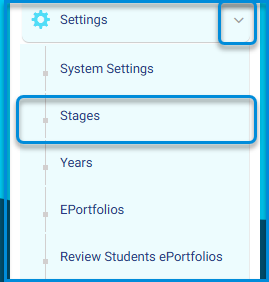
Main Menu >> Settings >> Stages

To Add a New Stage: #
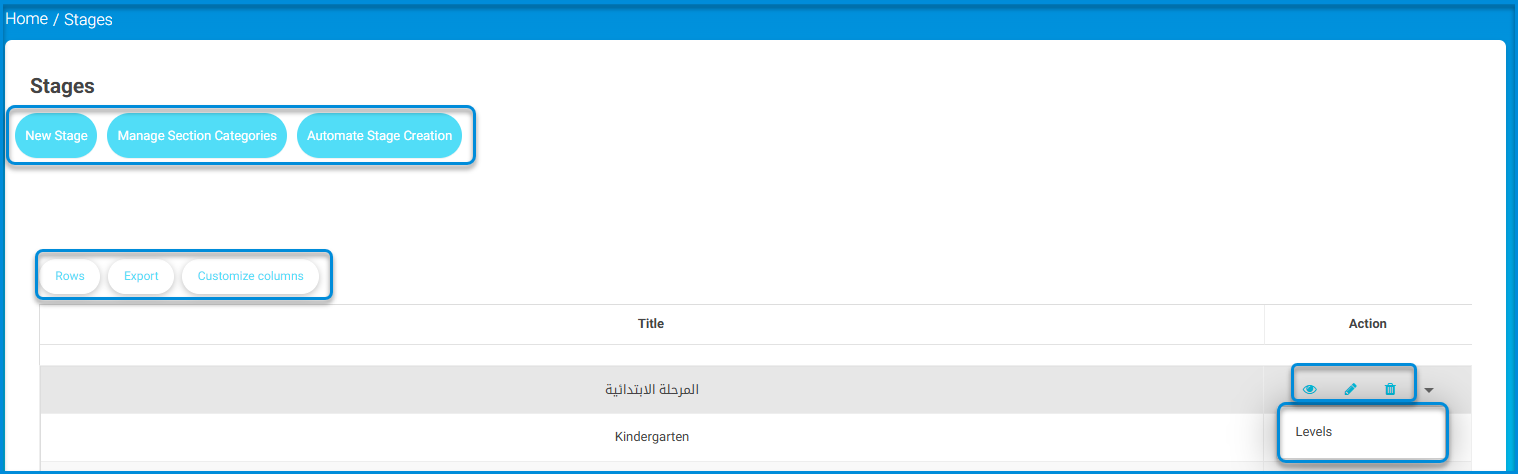
  1. Click the Add Stage button on the Stages page to add stages individually.
  2. Select the stage you want from the drop-down list. (Kindergarten-Primary-Intermediate-High-University)
  3. Add a title to your stage.
  4. Add the title in the secondary language.
  5. Click Submit.
  6. Your stage shows in the Stages table and is ready for the next step !!

Note: If you are adding all of your stages for the first time, it’s better to use the Automate Stage Creation feature to create all stages and their levels once and for all.

  • Click the small arrow next to the stage from the Action column in the table to move to the next step and add the stage’s levels.
To Add a New Level : #
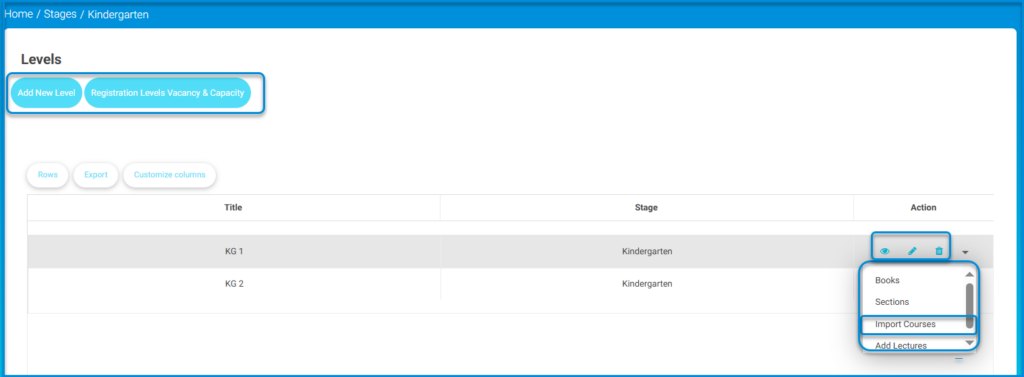
  1. Click the Add New Level button on the Levels page.
  2. Select the Master Level from the drop-down list.
  3. Type a title for your level.
  4. Type the title in the secondary language.
  5. Select the order of your level by clicking the radio button.
  6. Check the Hide from Registration Page checkbox if you want to hide your level from the registration page.
  7. Click Submit.
  8. Your level shows in the Levels table and is ready for the next step!!
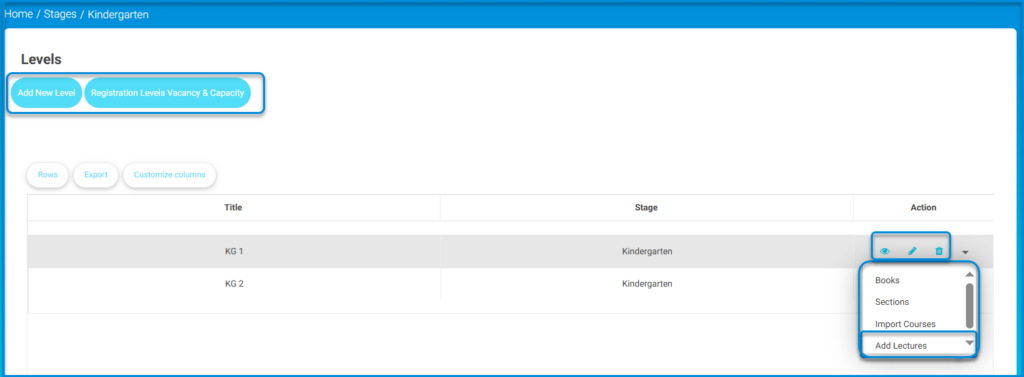
  • Click the small arrow next to the level from the Action column in the table to move to the next steps:
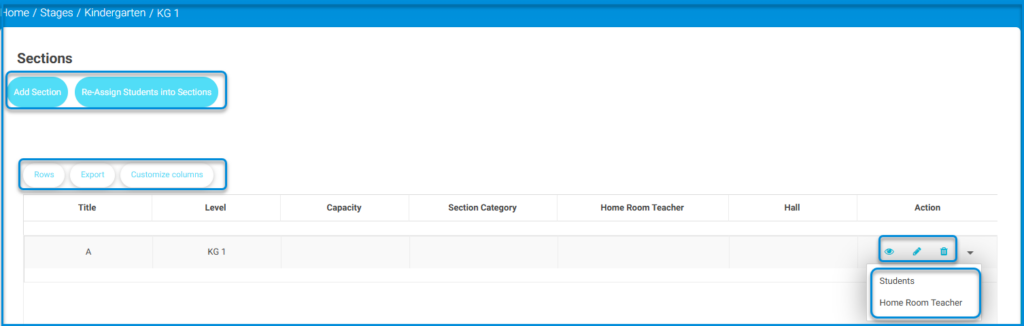
    • Adding the level’s sections
    • Importing courses
    • Adding Lectures

The Import Courses option allows you to upload many courses in bulk which saves time and effort.

  • To import courses, download the sample file, fill it with the required data, then re-upload it. It is important to abide by the rules stated in this page to avoid any errors.
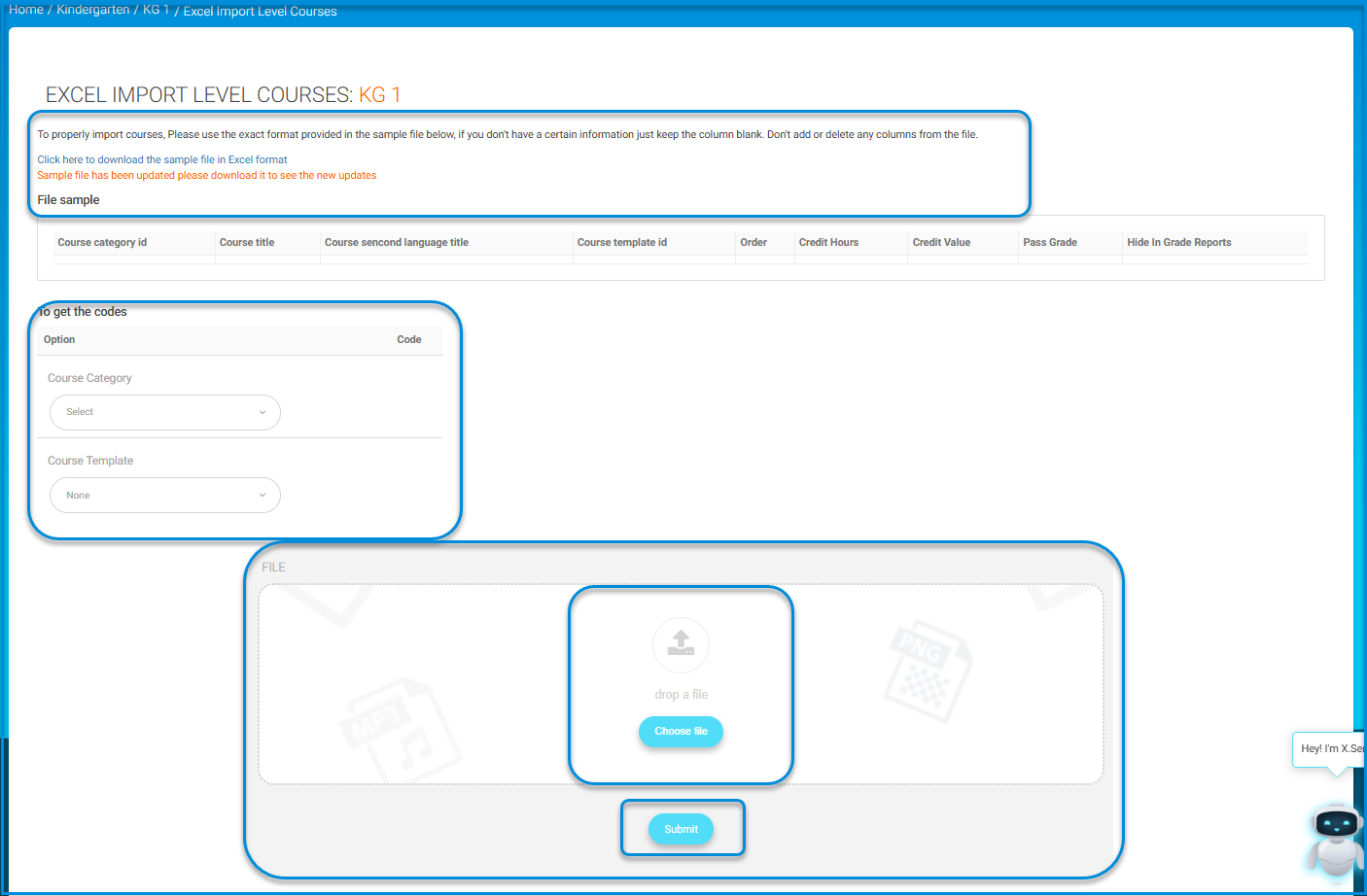
  • You can upload courses individually one by one from Course Management >> Courses.

To Add a Lecture : #
  1. Click Add Lectures from the Action drop-down list.
  2. Select the course to which this lecture will be added.
  3. Select the teacher of this course.
  4. Select the section to which this lecture will be assigned.
  5. Click Add.

Now, you have added your stages, levels, sections, courses, and lectures. You better get started!!


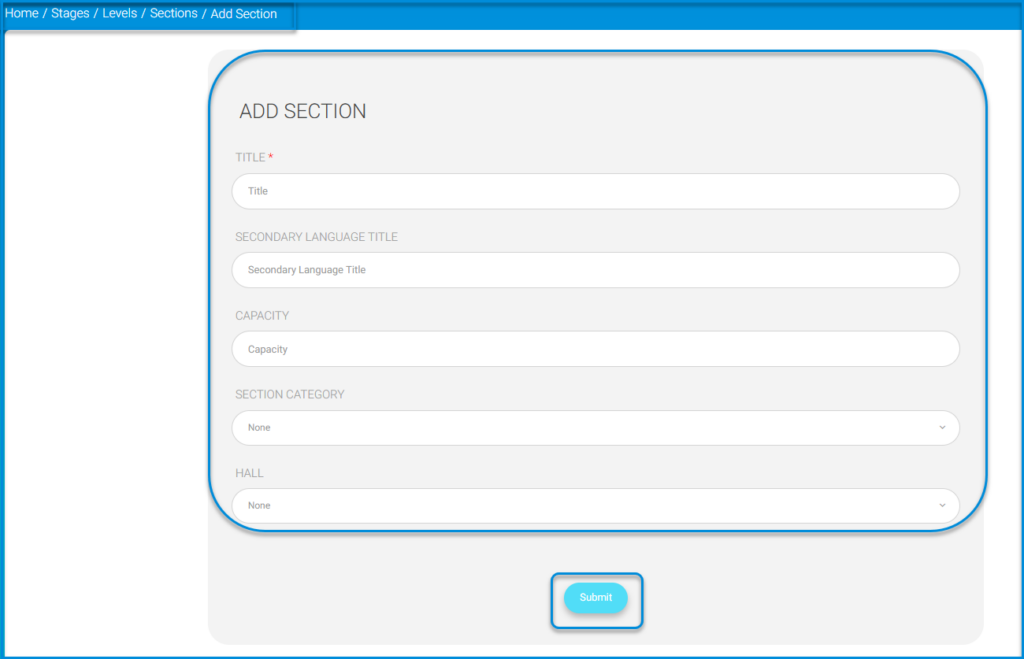
To Add a New Section : #
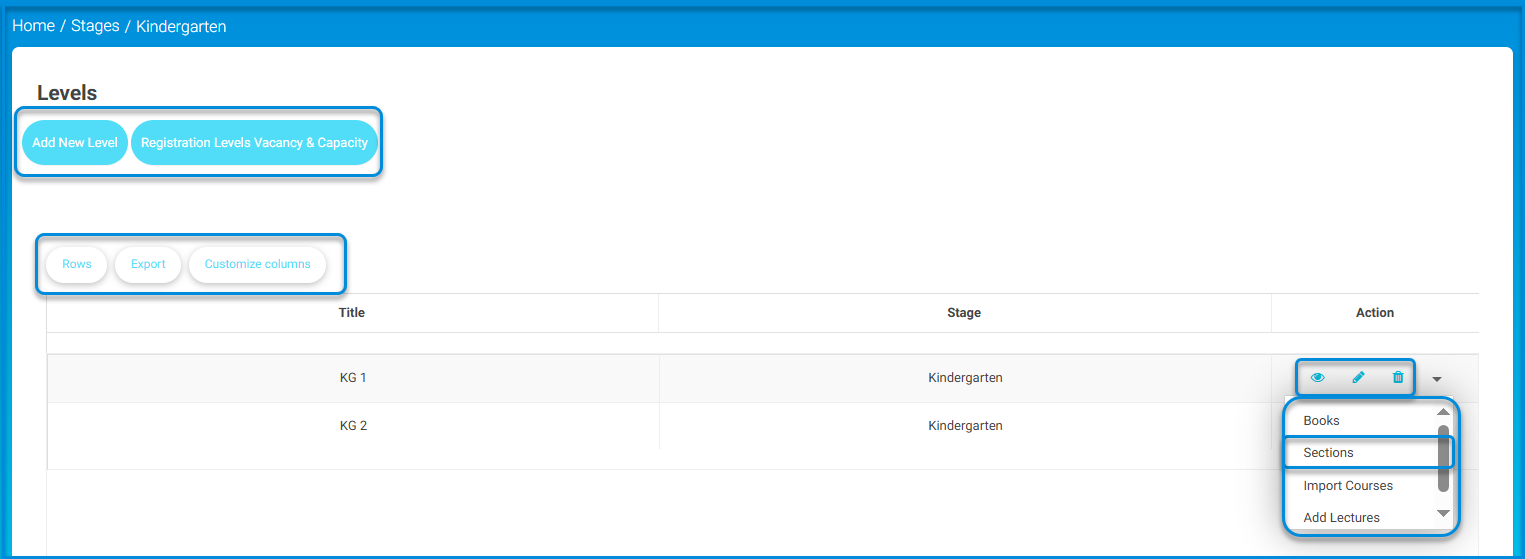
  1. Click the Add Section button on the Sections page.
  2. Add a title for your section, for example, Section A.
  3. Add the title in the secondary language.
  4. Determine the section capacity of students, for example, 20 students.
  5. Select the Section Category.
  6. Select the Hall of the section. (where this section would take place)
  7. Click Submit.
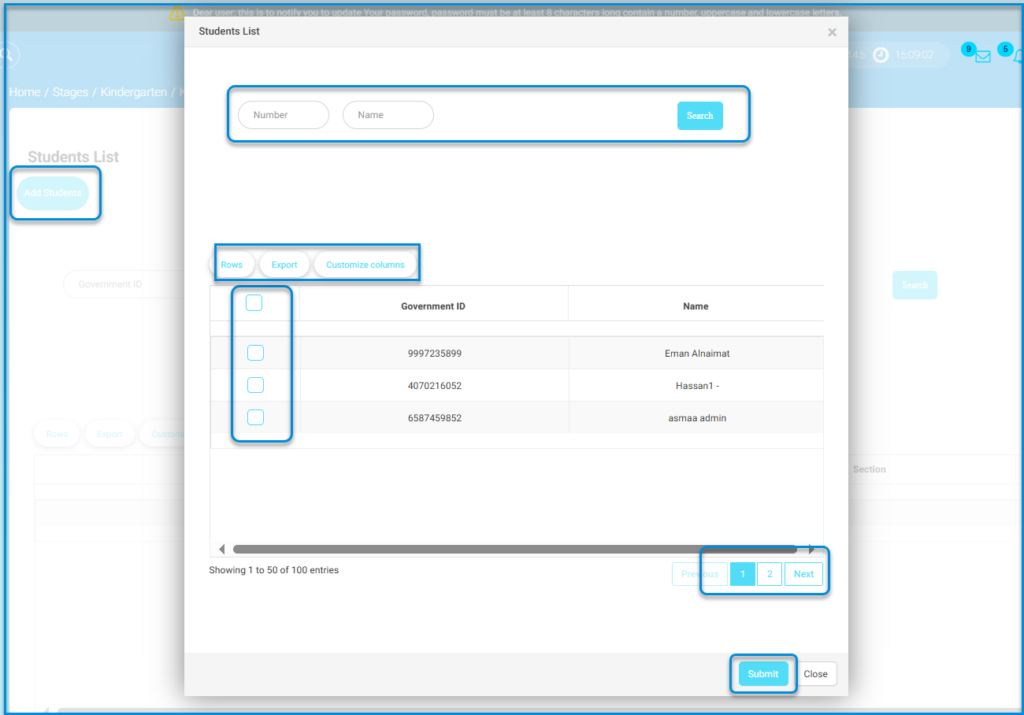
  8. Your section shows in the Sections table where you can view, edit and delete it. In addition, the small arrow in the Action column enables you to add students and the homeroom teacher to your section.

Note: You may assign students to sections while you add them on the Users >> Students >> Add Student page.

What are your Feelings

Share This Article :

  • Facebook
  • X
  • LinkedIn
  • Pinterest
System Settings—Part FourYears
Table of Contents
  • To Add a New Stage:
  • To Add a New Level :
  • To Add a Lecture :
  • To Add a New Section :