Skip to content
| Manual Bsera
| Manual Bsera

English
English
Arabic French

| Manual Bsera
| Manual Bsera
Popular Search reportreport cardBehaviorالمالت

Teacher Account

  • Login Page
  • Motivation
    • The New Way of Learning
    • My Score
  • Home Page
    • Edit Profile
    • Homepage
    • My Tasks & Action Required 
    • Courses Widget (All Courses)  
    • Announcements & Upcoming Events 
    • PUBLIC PROFILE 
    • Clubs Courses
  • Show all courses
    • COURSES
      • Charts and Behavior Analysis
      • Tab 1
        • Excel Sheet Grades Import
        • Manage Students Groups
        • Managing Content
        • Lecture Management
        • Students List
        • Students’ Report Summary
      • Tab 2
        • Course Materials
        • Video Lectures
      • Tab 3
        • In-Class Activity
        • Assignments, Exams
        • Assignment Actions
        • Assignment Sections
        • Assignment Questions
        • Exams
        • Exam Styles
        • Exam Sections
        • Assignment settings
        • Exam Settings
        • Exam Settings | More options
      • Tab 4
        • Digital Libraries
        • Weekly Study Plan
        • Semester Plan
        • Course Preparations
      • Tab 5
        • Management of Timetable 
  • Books
    • Books
  • Classroom Attention Indicator
    • Classroom Attention Indicator –
  • Messages
    • Sent Messages
    • Draft Messages
    • Archived Messages
    • Compose
    • Deleted Messages
  • Discussions
    • Discussion Rooms
    • Adding New Discussion Rooms
    • Adding New Posts
    • Comments Management
  • Questions Banks
    • Add Questions from Q-Banks
    • Exam Questions
    • Add Bulk Questions
  • My Schedule
    • Schedule
    • Academic Calendar
      • Academic Calendar
      • Editing Events
      • Adding Events
  • Virtual Classes
    • Virtual Classrooms
  • Teacher Library
    • PUBLIC LIBRARY
    • VIRTUAL LABS 
    • My Files
  • Absence Report
    • Absence Report
  • Certificates | Letters
    • Issued Certificates | Letters
    • Certificates | Letters
    • My Certificates
    • Sign Multiple Certificates
    • My Letters
    • Issue Certificates
  • Teacher B~SERA AI
    • Manage Content (Xsera) 
    • My Teaching Hub 

Parent Account

  • Login Page
  • Homepage
    • Personal Menu
    • Edit Profile
    • Personalized Child Dashboard & Learning Analytics 
    • Services & Quick Access Tools 
    • Homepage
    • Student Accounts
  • Messages
    • Deleted Messages
    • Draft Messages
    • Archived Messages
    • Compose
    • Sent Messages

Student Account

  • Login Page
  • Home Page
    • Personal Menu
    • Edit Profile
    • Quick Access – Exams, Assignments, Virtual Class 
    • Student Homepage
  • Subjects
    • Subjects
    • Course Materials
    • Video Lectures
    • Discussion Rooms
    • Online Assignments 
    • Exams
  • Previous Course Contents
    • Previous Subject Contents
  • Book
    • books
  • My Schedule
    • Schedule
    • Weekly Study Plan
    • Academic Calendar
      • Academic Calendar
      • Adding Events
      • Editing Events
  • Digital Library
    • Digital Library 
    • Subjects Library
    • Public Library
    • Custom Libraries
    • My files
  • Evaluation Tools
    • Evaluation
    • form
  • Virtual Classes
    • Virtual Classrooms
  • Messages
    • Draft Messages
    • Messages
    • Compose
    • Inbox
    • Sent Messages
    • Archived Messages
    • Deleted Messages
  • Attendance
    • Daily Lateness
    • Lesson Absences
    • Daily Absences
    • Subject Absences Summary
    • Lesson Lateness
    • Absences Summary
  • Certificates | Letters
    • Certificates | Letters
  • Student B~SERA AI
    • Circle to Learn  
    • Study Plan (Student) 
    • My Learning Hub 

Teacher Supervisor Account

  • Login Page
  • Homepage
    • Edit Profile
    • Announcements & Upcoming Events 
    • Courses Widget (All Courses)  
    • My Tasks & Action Required 
    • Homepage
  • Academic Calendar
    • Calendar
    • Editing Events
    • Adding Events
  • Certificates | Letters
    • Issue Certificates
    • Certificates | Letters
    • My Letters
    • My Certificates
    • Issued Certificates | Letters
  • Evaluations | Surveys
    • Forms
    • Evaluation | Surveys
  • Messages
    • Draft Messages
    • Compose
    • Archived Messages
    • Mailbox
    • Deleted Messages
    • Sent Messages
  • Management Reports
    • Management Reports
  • Public Library
    • Public Library/Digital Content
  • Questions Banks
    • Questions Banks
  • Teachers list
    • Exams/Homework Without Questions
    • Teachers’ List
  • Virtual Classrooms
    • Upcoming Smart Classes
    • All Smart Classes
    • Recorded Smart Classes
    • Virtual Classrooms
  • Weekly Plan
    • Weekly Plan
  • Question Banks
    • Question Banks
  • Teachers' Statistics
    • Teachers’ Statistics
  • Teachers' Attendance Report
    • Teachers’ Attendance Report
  • Central Exams Comprehensive Report
    • Central Exams Comprehensive Report

Administrator Account

  • Login Page
  • Dashboard/Realtime Overview
    • Teachers Attendance Report
    • Teachers’ Preparations Report
    • Students’ Scores
    • Most Active Teachers in the Group
    • Online Users
    • Dashboard/Realtime Overview
  • important links
    • IMPORTANT LINKS 
  • Homepage
    • Edit Profile
    • Favorite Reports  
    • Goals Module (Xsera Quests) 
    • To Do List and Announcements 
    • Action Queue 
    • Active Alerts 
    • Personal Menu
    • Homepage
  • Support / Request
    • Transfer All School Guardians
    • Activation Ticket Resolution Report
    • Transfer Student
    • Fix Score
    • User Information
    • Guardian Transfer
    • New Feature Requests
    • LMS Support
    • Activation Ticket Resolution 
    • Internal Support
    • FAQs
  • Users
    • Manage Badge
    • Enhancements to User Management Filters
    • Users / Students
    • Students Without Sections
    • Guardians
    • Teachers
    • Teacher’s Statistics
    • Supervisors
    • Management
  • Weekly Plan
    • Weekly Plan /Dynamic weekly
    • weekly plan / Static
  • Subject Management
    • Questions Banks
    • Schedule Journal
    • Courses Management
    • Courses
    • Adding Courses
    • Course Templates
    • Trees
    • Areas
    • Areas – Adding Criteria
    • Exams Schedule
    • Exams Mark Comparison
    • Full Schedule
    • lectures
      • Lectures/ Schedules 
      • Lectures – Students List
      • Adding Lectures
      • Lectures/Manage Halls and Manage Medals 
      • Alternative Teacher
      • Lectures
      • Managing Timeslots
      • Adding Bulk Lectures
  • Settings
    • Enable PDF Conversion
    • Closure Management
    • Settings /part one
    • System Settings – part Two
    • System Settings / part three
    • System Settings—Part Four
    • Stages
    • Years
    • Years/Adding a Semester Plan
    • Years – Copy to Semester
    • Review Students E-Portfolios
  • Calendar
    • Adding Tasks to Calendar
    • Editing Events
    • Adding Events
    • Calendar
  • Messages
    • Draft Messages
    • Archived Messages
    • Inbox
    • Sent Messages
    • Compose
    • Deleted Messages
  • Announcements
    • Announcements
  • Report
    • Reports
    • Management Reports
    • Admissions Request Report
    • Redemption Statistics
    • Schools: C-Inspire Report
    • Students Badge Report
    • Medals Report
    • Files Log
    • School Group Absences
    • Full Day Absences Detailed Report
    • Lectures Absences Detailed Report
    • Activity Log
    • Messages Log
    • Score Drop
    • VCR Activation Report
    • Modules Activation Report
  • Certificates | Letters
    • Certificates | Letters
  • Forms and Assessments
    • Forms and Assessments
    • Forms
    • Evaluations
    • Assessments
  • Virtual Classrooms
    • Manage Users
    • Virtual Classrooms
  • Public library
    • Custom Libraries
  • B~SERA AI
    • Questions Banks (Xsera) 
    • Course Template 360 View 
    • Xsera AI Academic Planner 
    • Xsera AI Curriculum Engine 

Manager Account

  • Login Page
  • Homepage
    • Edit Profile
    • Personal Menu
    • Realtime Overview
    • Students’ Scores
    • Teachers’ Attendance Report
    • Teachers’ Preparations Report
  • Students
    • Daily Lateness
    • Daily Absences
    • Students’ Numbers Report
    • Registration Approval
    • Absences and Behaviors Reports
    • Students
  • Teachers
    • Daily Absences
    • Conditional Course Absences Summary
    • Course Absences Summary
    • Course Absences
    • Lectures Absences
    • School Schedule
    • Teachers Timeslots
    • Workload Report
    • Teachers
  • Guardians
    • Parents/Guardians
  • Messages Log
    • Messages Log
  • Class Visits
    • Class Visits
    • Adding New Class Visits
    • Copy from Template
  • Absences
    • Full Day Absences Detailed Report
    • Lectures Absences Detailed Report
  • Announcements
    • Announcement
    • Add Announcements
  • Stages
    • Stages
  • Messages
    • Draft Messages
    • Archived Messages
    • Sent Messages
    • Mailbox –
    • Inbox –
    • Deleted Messages
    • Compose
  • Academic Calendar
    • Select Calendar Owner
    • Adding Tasks to Calendar
    • Editing Events
    • Adding Events
    • Calendar
  • Management Reports
    • Management Reports
  • VCR Activation Report
    • VCR Activation Report
  • Public Library
    • My Files
    • Custom Libraries
    • Public Library (All)
  • Evaluations | Surveys
    • Evaluation stages report
    • Adding Surveys
    • Evaluations and Surveys
  • Forms
    • Forms
  • Certificates | Letters
    • Create New Templates
    • Manage Layouts
    • Create New Layout
    • My Signature
    • My Letters
    • My Certificates
    • Manage Templates
    • Issue Certificates | Letters
    • Certificates | Letters
  • Virtual Classrooms
    • Virtual Meetings
      • Virtual Meetings
      • Virtual Meetings
        • Recorded Smart Classes
        • Upcoming Smart Classes
        • MS Teams
          • MS Teams Meeting Room Main Screen
          • Joining MS Teams Meeting Rooms
          • Adding Virtual Meetings Using MS Teams
        • Zoom Meeting
          • Zoom Meeting Room Main Screen
          • Adding New Zoom Meeting Rooms
          • Joining Zoom Virtual Meeting Room
  • Statistics
    • Communication Statistics
  • Activation Reports
    • Activation Reports
  • Stats
    • General Statistics
    • Stats
    • Statistics with Interaction
  • Full Schedule
    • Full Schedule

Adviser Account

  • Login Page
  • Main Menu
    • Main screen
  • HOME
    • Edit Profile
  • Students List
    • Conditional Courses Absences
    • Student Affairs Summary
    • Full day Absences Detailed Report
    • Student list
    • Course Absences Summary
    • Absences Summary
    • Course Absences
    • Daily Absences
    • Students List
  • Guardians List
    • Parents List
  • Academic Calendar
    • Edit Event
    • Adding Event
    • Academic Calendar
  • Messages
    • Inbox
    • Draft Messages
    • compose
    •  Sent Messages
    • Deleted Messages

Floor Supervisor

  • Login Page
  • Absences
    • Teachers Attendance Report
    • Full Day Absences Detailed Report
  • Students List
    • Daily Absences
    • Course Absences
    • Absences Summary
    • Course Absences Summary
    • Conditional Courses Absences
    • Full day Absences Detailed Report
    • Student Affairs Summary
    • Students List
  • Messages
    • Inbox
    • Trash
    • Sent Messages
    • Archived Messages
    • Draft Messages
    • Compose
    • Mailbox

Senior Teacher

  • Login Page
  • Homepage
    • Edit Profile
    • Announcements & Upcoming Events 
    • Courses Widget (All Courses)  
    • My Tasks & Action Required 
    • Homepage
  • Academic Calendar
    • Calendar
    • Adding Events
    • Editing Events
  • Certificates | Letters
    • Certificates | Letters
    • Issued Certificates | Letters
    • My Certificates
    • My Letters
    • Issue Certificates
  • Evaluations | Surveys
    • Forms
  • Messages
    • Sent Messages
    • Deleted Messages
    • Mailbox
    • Archived Messages
    • Compose
    • Draft Messages
  • Management Reports
    • Management Reports
  • Public Library
    • Public Library/Digital Content
  • Teachers list
    • Teachers’ List
    • Exams/Homework Without Questions
  • Virtual Classrooms
    • Virtual Classrooms
    • Upcoming Smart Classes
    • Recorded Smart Classes
    • All Smart Classes
  • Weekly Plan
    • Weekly Plan
  • Question Banks
    • Questions Banks
  • Teachers' Statistics
    • Teachers’ Statistics
  • Teachers' Attendance Report
    • Teachers’ Attendance Report
  • Central Exams Comprehensive Report
    • Central Exams Comprehensive Report
View Categories
  • Home
  • Docs
  • Parent Account
  • Homepage
  • Personalized Child Dashboard & Learning Analytics 

Personalized Child Dashboard & Learning Analytics 

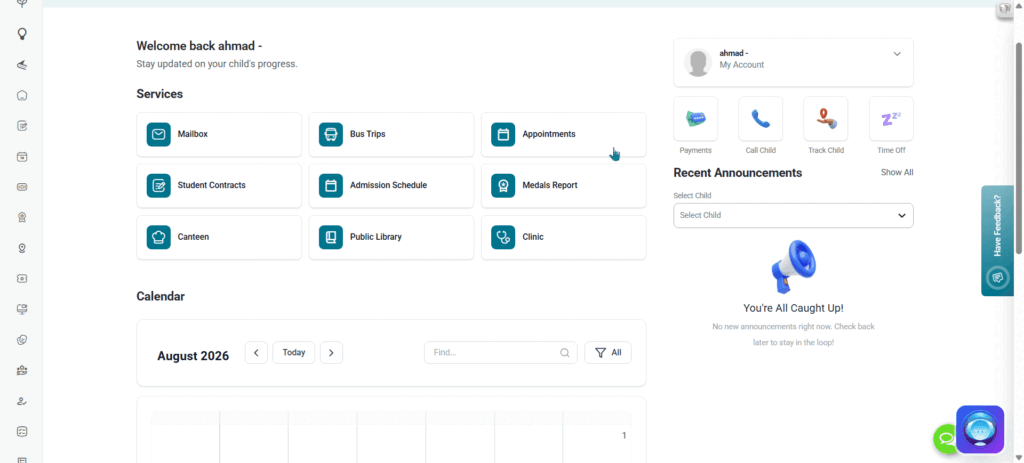
The Personalized Child Dashboard provides guardians with an individualized view of a specific student’s academic standing. By selecting a child, guardians can monitor real-time learning analytics, track active study plans, view daily lecture schedules and calendar events, inspect report cards and certificates, browse school photo albums, and manage quick daily actions. 
1. Child Selection  #

Initial Selection  #

  1. Upon logging in, guardians are presented with the Pick a Child window listing all linked students, their grade levels, and their assigned schools. 
  1. Select a specific child card and click Pick Child to open their personalized dashboard. 

2. Learning Analytics & Key Performance Indicators (KPIs)  #

At the top of the workspace, a learning analytics summary displays three main performance cards, which update automatically every 24 hours: 

Overall Progress (OP)  #

  1. A calculated percentage score representing the student’s overall performance across the current semester. 
  1. Calculation: Weighted average of Attendance Rate (AR), Content Engagement (CE), Submission Rate (SR), and Pass/Proficiency Rate (PR). 
  1. Attendance Rate (AR): Full present days divided by total attendance days recorded. 
  1. Content Engagement (CE): Viewed published materials (videos, course files, virtual classroom recordings, additional libraries) divided by total published content up to calculation time. 
  1. Submission Rate (SR): Exams and assignments submitted on time divided by total published assessments whose due date has passed. 
  1. Pass/Proficiency Rate (PR): Graded exams with a score meeting or exceeding the passing threshold (defaulting to 50% if unassigned) divided by total published graded exams with visible marks whose due date has passed. 

Attendance Rate  #

  • Displays the percentage of school days the student was marked as fully present during the semester. 

Assignments Done  #

  • Displays the percentage of completed assignments calculated as total submitted assignments divided by total published assignments whose due date has passed. 

3. Schedule & Calendar  #
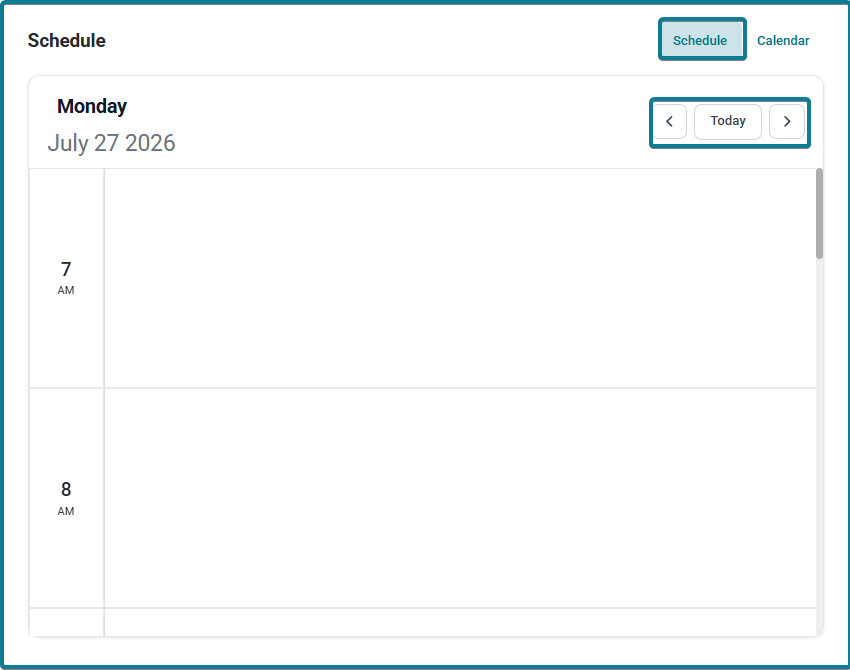
A tabbed widget allowing guardians to toggle between daily class timetables and calendar event views: 

Daily Schedule Tab  #

  1. Displays a daily timetable showing scheduled lectures for the current day. 
  1. Use the navigation arrows surrounding the Today button to switch between days within the active week.

Calendar Tab  #

  1. Displays combined calendar events for both the guardian and the active child. 
  1. Child-specific events explicitly display the child’s name for easy distinction. 
  1. Filter: Filter events by All, Me (guardian only), or the child’s name. 
  1. Search & Navigation: Search events by title or use the month arrows to navigate through the academic calendar. 

4. Report Cards & Certificates  #

Report Cards  #

  1. Displays the child’s latest academic report cards with status badges. 
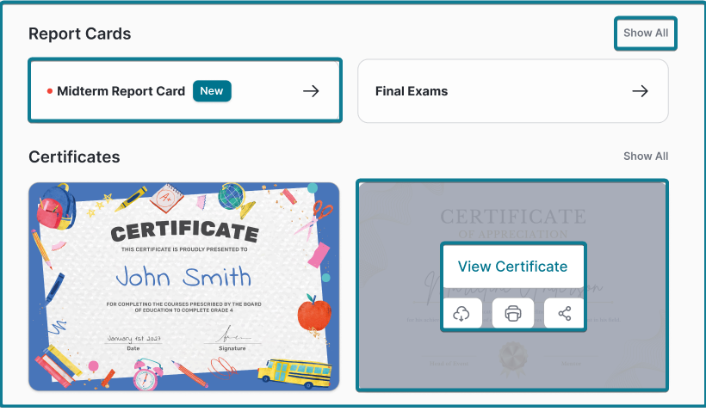
  1. Status Labels: Unseen report cards display a New badge; previously viewed report cards carry no label. 
  1. Click any report card card to view its full detailed breakdown, or click Show All to open the complete report card repository. 

Certificates  #

  1. Displays official certificates earned by the student during the semester. 
  1. Click Show All to view the full certificates list. 
  1. Clicking a certificate card opens four actions: 
  1. View Certificate: Previews the certificate document. 
  1. Download: Saves a digital PDF copy. 
  1. Print: Opens direct document printing. 
  1. Share: Generates a PDF file to share directly via messaging and social channels (WhatsApp, Instagram, X, Teams, Facebook, Messenger, and LinkedIn). 

5. Right-Side Information Panel & Widgets  #

The Right-Side Panel serves as an ongoing engagement and monitoring column. It consolidates student account selector cards, monthly gamification stats, quick action buttons, and a multi-tabbed updates widget containing Announcements, Exams, and Assignments. 

Part A: Student Account Card & Semester Selector  #

  1. Student Overview: Displays the currently selected student’s profile picture, full name, academic year (e.g., 2026-2027), and school logo with title. 
  1. Semester Selector: A dropdown menu allowing guardians to switch between academic terms (e.g., First Semester – 2026-2027) to view historical or current term data. 

Part B: Gamification & Engagement Counters  #

Directly beneath the student card, two summary tiles track monthly participation: 

  1. Score: Displays the total gamification points earned by the student during the active month for participating in platform activities. 
  1. Badges This Month: Displays the total count of badges and honors awarded by teachers during the active month. 

Part C: Quick Access Action Buttons  #

Four direct shortcut buttons allow guardians to trigger immediate administrative actions for the selected child: 

  1. Payments: Direct access to fee statements and online payment gateways filtered specifically to the child’s school. 
  1. Call Child: Triggers an immediate pickup notification to school administration and campus dismissal supervisors. 
  1. Track Child: Launches the interactive tracking map showing live bus routes and physical campus attendance status. 
  1. Time Off: Opens the leave request form to submit medical excuses or absence notifications. 

Part D: Tabbed Updates & Content Widgets  #

Located beneath the quick access buttons, a unified navigation widget features three main tabs: Announcements, Exams, and Assignments. 

Tab 1: Announcements  #
  1. Select Child Dropdown: Allows guardians to filter broadcasts specifically by student or select All. 
  1. Empty State: When no new notices are available, displays a loudspeaker illustration with the message: “You’re All Caught Up! No new announcements right now. Check back later to stay in the loop!” 
  1. Active State & Show All: Displays targeted announcement cards labeled as Me or with the child’s name. Click Show All to open the full announcement repository. 
Tab 2: Exams  #
  1. Status Filter Dropdown: Features a dedicated dropdown menu to filter assessments by specific status: 
  1. All: Displays all exams regardless of status. 
  1. Due: Filters for upcoming exams whose due date hasn’t arrived yet. 
  1. Not Attempted: Filters for exams that the student missed or hasn’t taken yet. 
  1. Graded: Filters for submitted exams that have been evaluated by the teacher. 
  1. Submitted: Filters for submitted exams currently awaiting teacher evaluation. 
  1. Action Buttons & Detail Links: Depending on the status, provides buttons for View, Submission Grade, Standards Achievement, or Missed view. Click Show All to view the full exams page. 
Tab 3: Assignments  #
  1. Status Filter Dropdown: Includes the same dedicated status filtering options: 
  1. All: Displays all homework assignments. 
  1. Due: Shows active assignments with upcoming due dates and times. 
  1. Not Attempted: Displays unsubmitted or overdue assignments. 
  1. Graded: Shows evaluated assignments with final scores and feedback. 
  1. Submitted: Shows completed assignments pending teacher grading. 
  1. Action Buttons & Detail Links: Provides View and Submission Grade buttons based on status. Click Show All to open the full assignments repository. 
What are your Feelings

Share This Article :

  • Facebook
  • X
  • LinkedIn
  • Pinterest
Edit ProfileServices & Quick Access Tools 
Table of Contents
  • 1. Child Selection 
    • Initial Selection 
  • 2. Learning Analytics & Key Performance Indicators (KPIs) 
    • Overall Progress (OP) 
    • Attendance Rate 
    • Assignments Done 
  • 3. Schedule & Calendar 
    • Daily Schedule Tab 
    • Calendar Tab 
  • 4. Report Cards & Certificates 
    • Report Cards 
    • Certificates 
  • 5. Right-Side Information Panel & Widgets 
    • Part A: Student Account Card & Semester Selector 
    • Part B: Gamification & Engagement Counters 
    • Part C: Quick Access Action Buttons 
    • Part D: Tabbed Updates & Content Widgets 
      • Tab 1: Announcements 
      • Tab 2: Exams 
      • Tab 3: Assignments