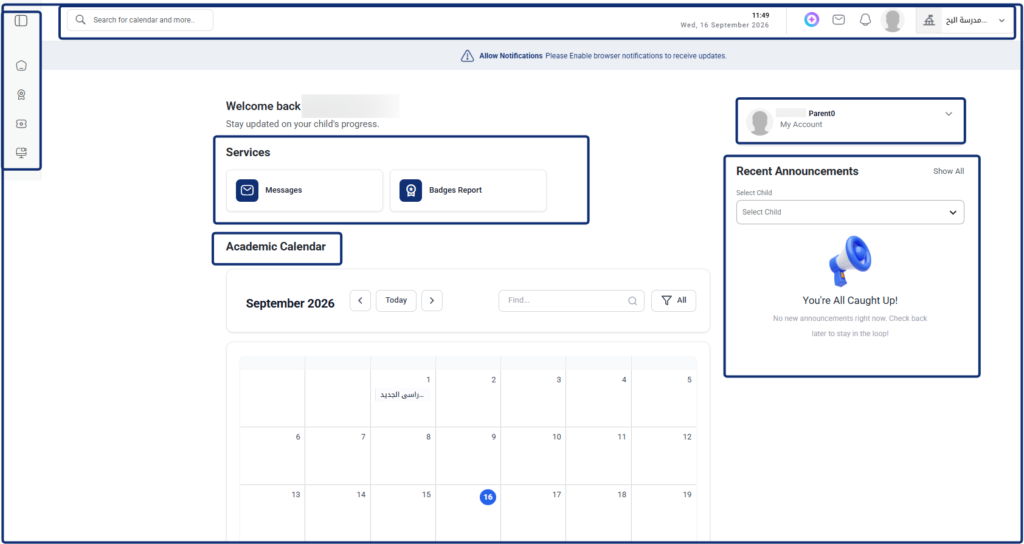
The Guardian Dashboard serves as the central command hub for parents in Classera. It provides a unified portal to track academic progress across multiple children, review individual schedules, access direct child interaction services, and monitor targeted school announcements.
Dashboard Accounts & Profile Switching #
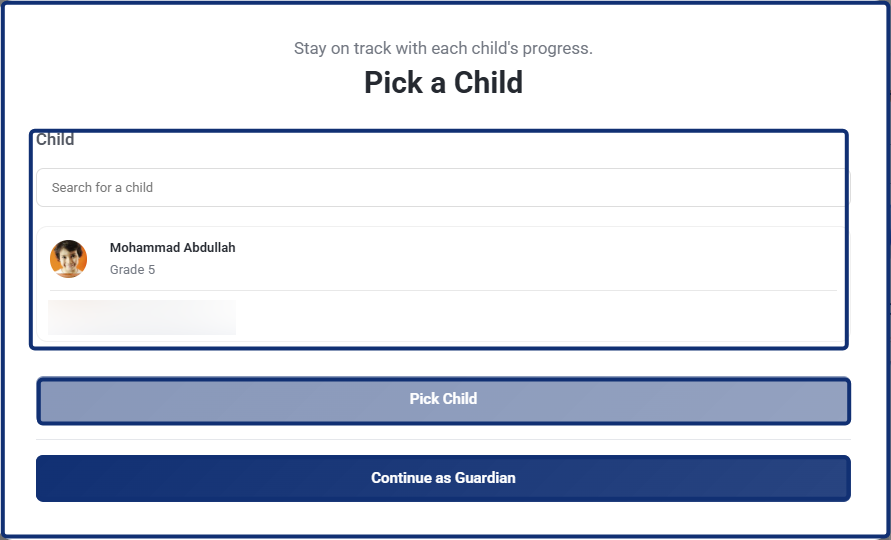
Initial Profile Selection Modal (“Pick a Child”) #
- When logging in or accessing student views, a Pick a Child window displays listed children (e.g., hamza ahmad, Nour Mustafa) along with their assigned grade levels and schools.
- Use the search box to filter through multiple children by name.
- To Switch to a Child’s View: Select a child from the list and click Pick Child.
- To Access Guardian Overview: Click Continue as Guardian to stay in the primary parent overview workspace.
Header Profile Switcher #
- Located at the top right corner of the main header bar.
- Click the profile dropdown menu to display all linked accounts:
- Switching to Student View: Select a specific child’s name from the list to leave the Guardian view and navigate directly into that student’s dedicated course workspace, grades, and personal dashboard.
- Returning to Guardian View: Select your parent account profile from the list (or click Back to Admin Account) to return to the centralized Guardian Dashboard.
Key Dashboard Sections #
- Recent Announcements: Located on the right panel, this widget delivers direct school notices. Use the Select Child dropdown to filter updates for a specific child, or click Show All to view all historical announcements.
- Services: Provides quick-access shortcuts to essential communication and recognition tools:
- Messages: Access inbox, school communications, and direct messaging with educators.
- Badges Report: Review gamification badges and motivational awards earned by your children.
- Academic Calendar: A monthly timetable showing upcoming school events, terms, and deadlines. Use the search bar to locate specific entries, toggle navigation arrows to change months, or use the filter button to sort event types.