


تُعد الصفحة الرئيسية للمعلم بمثابة المركز التشغيلي الأساسي للكوادر التعليمية في كلاسيرا. توفر للمعلمين واجهة مباشرة ومبسطة لمتابعة المهام اليومية، تنفيذ الإجراءات السريعة للمواد، تتبع النقاط والمكافآت، ومتابعة الإعلانات المدرسية.
للوصول إلى هذا القسم:
- Log into your Teacher account.
- You will land directly on the Dashboard Overview page.
أقسام الصفحة الرئيسية للمعلم #
عند تسجيل الدخول، تعرض الصفحة الرئيسية الأجزاء التالية:
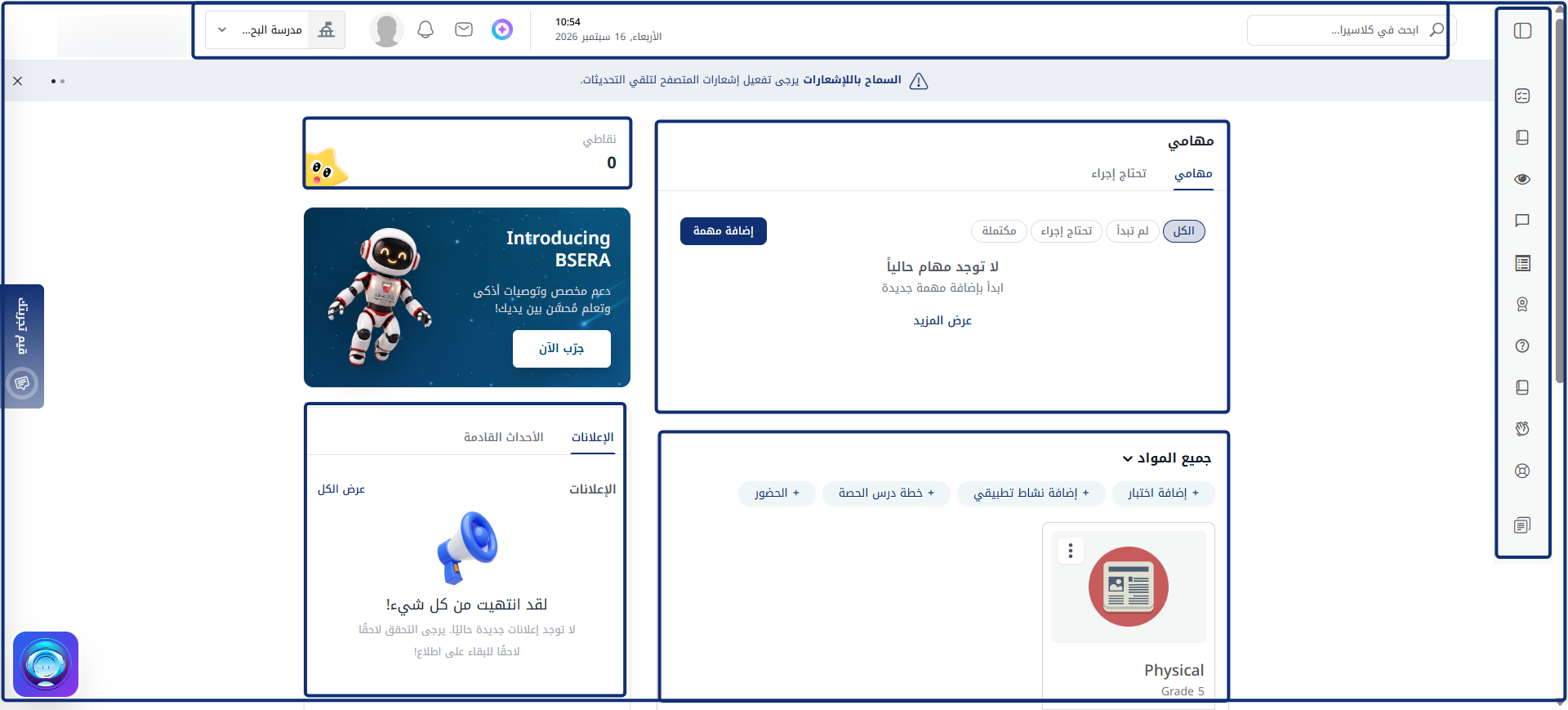
1. القائمة الجانبية #
تمتد على الجانب الأيمن للشاشة وتوفر تنقلاً سريعاً بين الوحدات التعليمية الأساسية مثل: الخطة الأسبوعية، إدارة المواد، بنوك الأسئلة، دفاتر الدرجات، التقويم، وغيرها.
2. شريط التنقل العلوي #
يعمل كشريط تحكم سريع أعلى الصفحة:
- Search Bar: Centralized search field to quickly locate calendar records, pages, or system tools.
- الوقت والتاريخ: يعرض الساعة والتاريخ الفعليين المتزامنين مباشرة مع خادم المنصة الرئيسي.
- ما الجديد: يفتح سجلاً يتضمن أحدث الميزات والتحديثات المنفذة في النظام.
- B-SERA AI Assistant: Launches the interactive AI helper for personalized support and smart recommendations.
- Mail Threads: Provides direct access to internal messages and correspondence.
- الإشعارات: تعرض التنبيهات الفورية لمتابعة أحداث المنصة أولاً بأول.
- User Profile Menu & School Switcher: Shows user details, assigned school campus, and account settings.
3. منطقة لوحة التحكم الرئيسية #
تنقسم المنطقة المركزية للوحة التحكم إلى لوحات وظيفية محددة:
أولاً: لوحة مهامي #
تقع في الجزء العلوي الأيسر من لوحة التحكم، وتجمع بين إدارة الإنتاجية الشخصية والتنبيهات المباشرة للإجراءات المطلوبة:
- تبويب مهامي:
- Add Task Button: Teachers can create custom personal tasks to track their daily teaching workflow.
- Status Filter Pills: Instantly sort personal tasks using All, To do, Action required, and Completed.
- تبويب الإجراء المطلوب:
- Displays urgent, system-generated operational alerts that require immediate teacher action across three main areas:
- Attendance: Highlights missing or pending student attendance rosters for specific classes (e.g., Biology Grade 5 — attendance not taken) along with the scheduled session time and a direct Take attendance > action link.
- Preparation: Flags courses with missing daily or weekly lesson preparations (e.g., Biology Grade 5 — 1 item(s) pending) along with a direct Add preparation > action link.
- Grades: Surfacing pending evaluation items, unsubmitted assignment marks, or uncompiled gradebook parameters that require immediate teacher input.
ثانياً: لوحة جميع المواد والإجراءات السريعة #
تقع أسفل لوحة مهامي مباشرة، وتضم اختصارات التشغيل السريع وبطاقات المواد:
- Quick Action Buttons: Direct shortcuts at the top of the panel to perform immediate actions across courses:
- + Create Exam: Launches the exam creation wizard.
- + Create Assignment: Opens the assignment creation tool.
- + Lecture Preparation: Direct link to create and publish daily lesson plans.
- + Attendance: Launches the student attendance registration sheet.
- Course Cards Grid: Displays active course cards (e.g., Biology Grade 5, Science Grade 3, Science Grade 7) showing the grade level along with counts for total Lessons and Exams.
ثالثاً: أدوات التحفيز والجوائز #
- My Score: Tracks total reward points accumulated by the teacher.
رابعاً: إعلان تقديم إكسيرا #
شريط ترويجي يرحب بمساعد الذكاء الاصطناعي (جربه الآن) للوصول إلى الدعم الذكي والتوصيات التعليمية التلقائية.
خامساً: مركز الإعلانات والفعاليات القادمة #
أداة مزدوجة لإبقاء المعلم على اطلاع دائم بأحداث المدرسة:
- Announcements Tab: Displays active school broadcasts, administrative memos, and pinned news.
- Upcoming Events Tab (Teacher Schedule): Functions as an interactive timetable and calendar planner for the teacher’s scheduled classes and events.


